Decision Tree - A tree🌳to make predictions!
By Saulo Gil
July 14, 2024
📒 What is Decision Tree❓
A decision tree is a popular machine learning model used for both classification and regression tasks.
It’s called a decision tree because it breaks down a dataset into smaller subsets while developing an increasingly detailed decision-making process resembling a tree’s structure.
   Is it raining outside?
     /               \
   Yes               No
    |                 |
 Grab an          Enjoy the
 umbrella          sunshine
Some key components and concepts related to decision trees:
Nodes: Represent a decision or a test on a specific attribute (feature) in the dataset;
Edges: Correspond to the outcome of a decision or a test, leading to the next node or leaf node;
Root Node: The topmost node that corresponds to the best predictor in the dataset;
Internal Nodes: Nodes that have child nodes and represent a decision rule based on a feature;
Leaf Nodes: Terminal nodes that predict the outcome (decision) of the model;
Decision Rules: The path from the root to the leaf represents a decision rule;
📒 How a Decision Tree is Built❓
Splitting: The process of dividing a node into two or more sub-nodes based on a feature’s value. The goal is to minimize uncertainty or impurity at each split;
Impurity Measures: Common measures include Gini impurity and entropy (information gain);
Stopping Criteria: Conditions when to stop splitting further, such as reaching a maximum depth, minimum samples at a node, or no further improvement in impurity reduction;
Pruning: The process of removing parts of the tree that do not provide any additional predictive power. This helps prevent overfitting.
Let’s do an example❗
👨💻 Programming language
- Python

📦 Libraries necessaries
from sklearn.datasets import load_iris
from sklearn.tree import DecisionTreeClassifier
from sklearn import tree
import matplotlib.pyplot as plt
🔋 Load the dataset - Iris
# Load dataset iris
iris = load_iris()
💻 Set the features and target
# set features and target
X = iris.data[:, 2:] # petal length and width
y = iris.target # target
💻🌳 Model - Decistion Tree
# model
tree_clf = DecisionTreeClassifier(max_depth=2)
🖥️🪫 Train the model
# fit
tree_clf.fit(X, y)DecisionTreeClassifier(max_depth=2)In a Jupyter environment, please rerun this cell to show the HTML representation or trust the notebook.
On GitHub, the HTML representation is unable to render, please try loading this page with nbviewer.org.
DecisionTreeClassifier(max_depth=2)
🌳 Let’s see the Tree🌳
# plot tree
plt.figure(figsize=(10, 10))
tree.plot_tree(tree_clf, filled=True)
plt.title("Decision Tree trained on all features")
plt.show()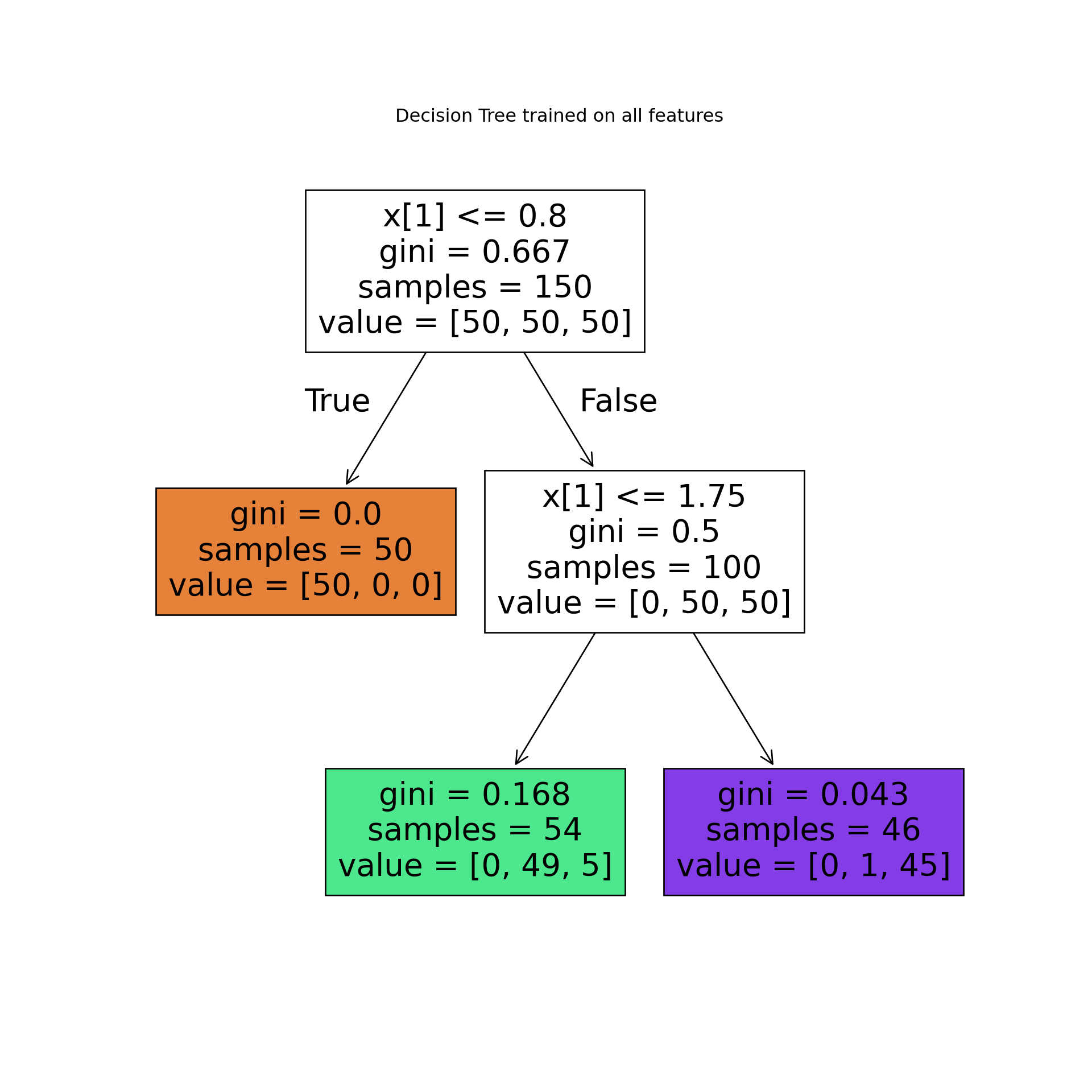 As we can see, the algorithm broke down dataset into 2 smaller subsets (trees)This approach is an effective way to predict an outcome.
Let’s see the decision tree in a more complex dataset❗
Imagine you are a medical researcher gathering data for a study. You’ve gathered information on a group of patients, all diagnosed with the same illness. Each patient underwent treatment with one of five medications: Drug A, Drug B, Drug C, Drug X, or Drug Y.
As part of your role, you need to develop a model to predict which drug would be suitable for future patients with the same illness. The dataset includes features such as Age, Sex, Blood Pressure, and Cholesterol levels of the patients, while the target variable is the medication to which each patient responded.
This dataset serves as a multiclass classifier sample. You can utilize the training portion of the dataset to construct a decision tree. Subsequently, this tree can be employed to predict the classification of an unfamiliar patient or to recommend a medication for a new patient.
Let’s do it❗
📦 Libraries necessaries
import numpy as np
import pandas as pd
from sklearn.model_selection import train_test_split
from sklearn.tree import DecisionTreeClassifier
import sklearn.tree as tree
from sklearn import metrics
import matplotlib.pyplot as plt
🔋 Load the dataset - IBM
The dataset utilized is available in the Machine Learning with Python in the Cognitive Class.ai.
my_data = pd.read_csv('https://cf-courses-data.s3.us.cloud-object-storage.appdomain.cloud/IBMDeveloperSkillsNetwork-ML0101EN-SkillsNetwork/labs/Module%203/data/drug200.csv', delimiter=",")

my_data.head(10)
## Age Sex BP Cholesterol Na_to_K Drug
## 0 23 F HIGH HIGH 25.355 drugY
## 1 47 M LOW HIGH 13.093 drugC
## 2 47 M LOW HIGH 10.114 drugC
## 3 28 F NORMAL HIGH 7.798 drugX
## 4 61 F LOW HIGH 18.043 drugY
## 5 22 F NORMAL HIGH 8.607 drugX
## 6 49 F NORMAL HIGH 16.275 drugY
## 7 41 M LOW HIGH 11.037 drugC
## 8 60 M NORMAL HIGH 15.171 drugY
## 9 43 M LOW NORMAL 19.368 drugY💻 Preparing the data
We need to set features matrix (X) and outcome vector (y).
Let’s do it❗
Let’s start selecting features.
X = my_data[['Age', 'Sex', 'BP', 'Cholesterol', 'Na_to_K']].values

X[0:5]
## array([[23, 'F', 'HIGH', 'HIGH', 25.355],
## [47, 'M', 'LOW', 'HIGH', 13.093],
## [47, 'M', 'LOW', 'HIGH', 10.114],
## [28, 'F', 'NORMAL', 'HIGH', 7.798],
## [61, 'F', 'LOW', 'HIGH', 18.043]], dtype=object)As we can see, some in this dataset are categorical, such as Sex or BP.
The Sklearn Decision Trees does not handle categorical variables, we can convert these features to numerical values.
Let’s use the LabelEncoder() method to convert the categorical variable into dummy variables.
from sklearn import preprocessing

le_sex = preprocessing.LabelEncoder()
le_sex.fit(['F','M'])LabelEncoder()In a Jupyter environment, please rerun this cell to show the HTML representation or trust the notebook.
On GitHub, the HTML representation is unable to render, please try loading this page with nbviewer.org.
LabelEncoder()
X[:,1] = le_sex.transform(X[:,1])


le_BP = preprocessing.LabelEncoder()
le_BP.fit([ 'LOW', 'NORMAL', 'HIGH'])LabelEncoder()In a Jupyter environment, please rerun this cell to show the HTML representation or trust the notebook.
On GitHub, the HTML representation is unable to render, please try loading this page with nbviewer.org.
LabelEncoder()
X[:,2] = le_BP.transform(X[:,2])


le_Chol = preprocessing.LabelEncoder()
le_Chol.fit([ 'NORMAL', 'HIGH'])LabelEncoder()In a Jupyter environment, please rerun this cell to show the HTML representation or trust the notebook.
On GitHub, the HTML representation is unable to render, please try loading this page with nbviewer.org.
LabelEncoder()
X[:,3] = le_Chol.transform(X[:,3])

X[0:5]
## array([[23, 0, 0, 0, 25.355],
## [47, 1, 1, 0, 13.093],
## [47, 1, 1, 0, 10.114],
## [28, 0, 2, 0, 7.798],
## [61, 0, 1, 0, 18.043]], dtype=object)YEAH, now yes👍
Now we can fill the target variable.
y = my_data["Drug"]

y[0:5]
## 0 drugY
## 1 drugC
## 2 drugC
## 3 drugX
## 4 drugY
## Name: Drug, dtype: object📌 Spliting data into train and test
It is easy to do with sklearn.model_selection.
X_trainset, X_testset, y_trainset, y_testset = train_test_split(X, y, test_size=0.3, random_state=3)Let’s see train dataset
print(X_trainset.shape)## (140, 5)print(y_trainset.shape)## (140,)## Shape of X training set (140, 5) & Size of Y training set (140,)NOW, we are ready for modelling 😎
💻🌳 Model - Decistion Tree
First, we created an instance of the DecisionTreeClassifier (drugTree).
We set 4 max_depth and entropy to choose the best feature at each decision tree node during the model building process.
drugTree = DecisionTreeClassifier(criterion="entropy", max_depth = 4)
drugTree
DecisionTreeClassifier(criterion='entropy', max_depth=4)In a Jupyter environment, please rerun this cell to show the HTML representation or trust the notebook.
On GitHub, the HTML representation is unable to render, please try loading this page with nbviewer.org.
DecisionTreeClassifier(criterion='entropy', max_depth=4)
🖥️🪫 Train the model
drugTree.fit(X_trainset,y_trainset)DecisionTreeClassifier(criterion='entropy', max_depth=4)In a Jupyter environment, please rerun this cell to show the HTML representation or trust the notebook.
On GitHub, the HTML representation is unable to render, please try loading this page with nbviewer.org.
DecisionTreeClassifier(criterion='entropy', max_depth=4)
💭 Let’s make predictions!
Let’s make some predictions on the testing dataset.
predTree = drugTree.predict(X_testset)print('Predicted:', predTree[0:5])## Predicted: ['drugY' 'drugX' 'drugX' 'drugX' 'drugX']print('Target:', np.array(y_testset[0:5]))## Target: ['drugY' 'drugX' 'drugX' 'drugX' 'drugX']AMAZING!!!, all 5 first are right!👏👏👏
Let’s see the precision of the model.
🎯 Evaluate the trained model
print("DecisionTrees's Accuracy: ", round(metrics.accuracy_score(y_testset, predTree),2))## DecisionTrees's Accuracy: 0.98😮WOwwww…This Decision Tree trained is highly accurate!
🌳 Let’s see the Tree🌳
plt.figure(figsize=(10, 10))
tree.plot_tree(drugTree, filled=True)
plt.title("Decision Tree trained on all features")
plt.show()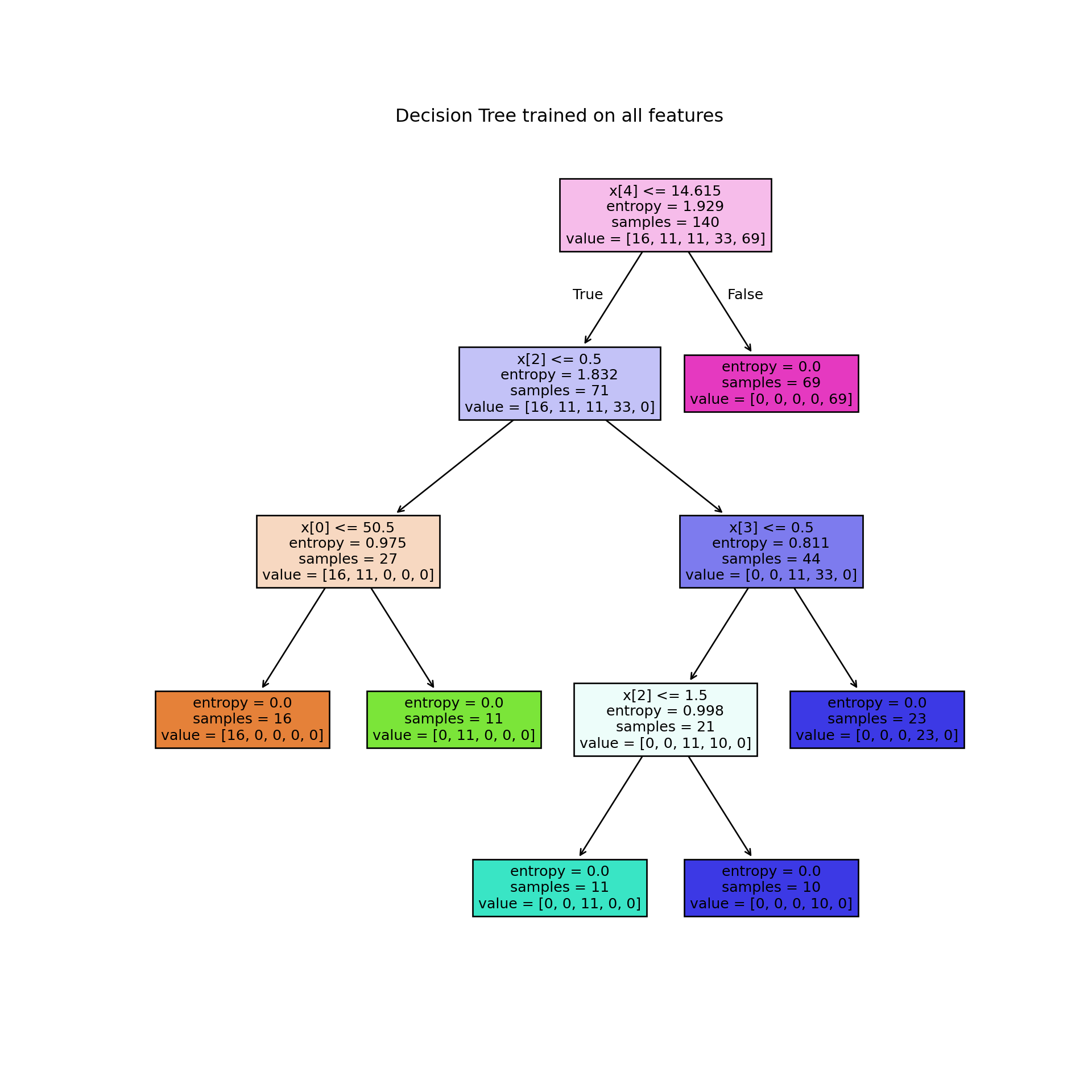
Although results suggest that Decision Trees are highly accurate, it is crucial to emphasize that this algorithm can easily overfit noisy data.
🤓 Conclusion
Decision trees are foundational in machine learning due to their straightforward yet powerful approach to decision-making. They represent a hierarchical tree-like structure where each internal node denotes a decision based on a specific feature, and each leaf node represents a final decision or outcome. This structure allows for easy interpretation and visualization of how decisions are made within the model.
Nevertheless, concerns such as overfitting, instability, and other potential challenges must be conscientiously addressed when employing decision trees.
It is noteworthy decision trees are fundamental in machine learning due to their simplicity and effectiveness, forming the basis for more complex ensemble methods like Random Forests and Gradient Boosting
Finally, decision trees remain integral to machine learning due to their intuitive nature, flexibility in handling different types of data, and pivotal role in the development of more advanced predictive models.
👍Advantages of Decision Trees:
Interpretability: Easy to understand and interpret, suitable for visual representation.
Handling Non-linearity: Can capture non-linear relationships between features and target variable.
Feature Selection: Automatically selects important features.
Handles Missing Data: Can handle missing values without requiring imputation.
👎Disadvantages of Decision Trees:
Overfitting: Can easily overfit noisy data.
Instability: Small variations in the data can result in a completely different tree.
Bias Towards Dominant Classes: May create biased trees if one class dominates.
Not Suitable for Regression with Continuous Variables: Decision trees may not be the best choice for predicting continuous variables.
Hope you enjoyed it!

- Posted on:
- July 14, 2024
- Length:
- 35 minute read, 7386 words
- See Also: