Binary Search Algorithm
By Saulo Gil
April 10, 2023
Binary Search Algorithm
What’s that for??
Suppose you are looking for a word in a dictionary beginning with the letter R. Although you may look the page-by-page from the letter A to R, it is unlikely you do it, probably you will go to the middle of the dictionary in order to save time.
Then, imagine you want to search for an e-mail in a large list of e-mails. The first letter of the e-mail is K. Again, probably you will run direct to the middle of the list.
Now, imagine you want to login your Facebook and, for it, you insert your e-mail and keyword and, finally, click “login”. When you request your login, Facebook needs to search your login in a very, very, very large list of members to check if the information of your login is correct.
These examples are search issues and they are very common. For it, BINARY SEARCH ALGORITHM is a useful and effective tool to solve these issues. It is noteworthy that an efficient search algorithm has important consequences in the speed of system.
LET’S SEE HOW THE SEARCH ALGORITHMS WORK
Linear Search Algorithm
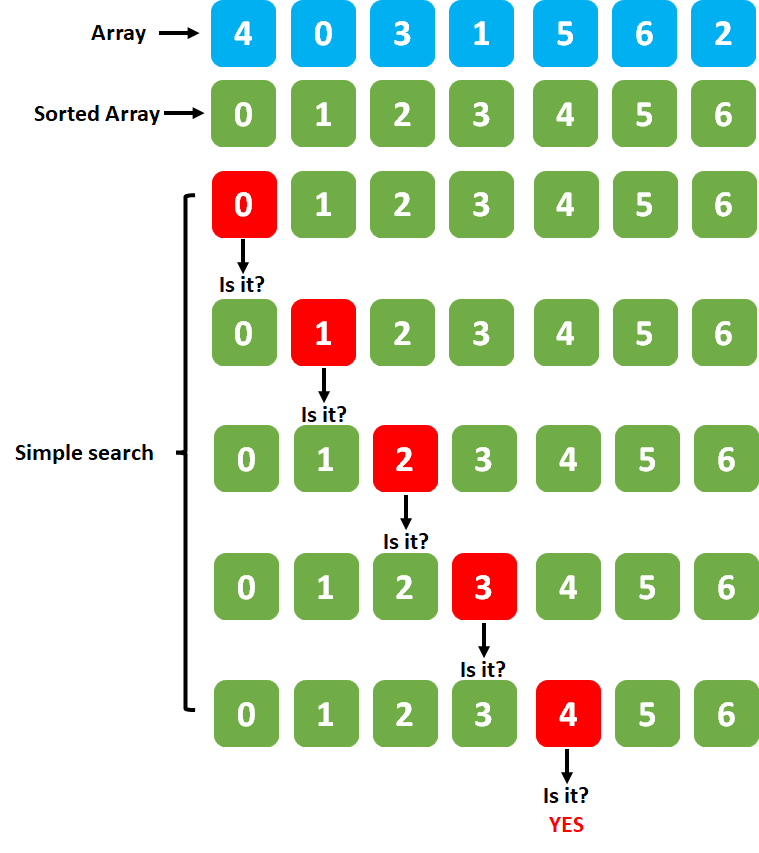
A linear search algorithm is a step-by-step procedure used to find a target element within a collection of data, such as an array or a list. The most basic search algorithm is linear search, also known as sequential search, which involves checking each element in the collection one by one until the target element is found or until the entire collection has been searched.
Runtime complexity of an Linear search algorithm is \(Big\ O = O(n)\) which means runtime increases linearly with the array size.
Look an example below.
Binary Search Algorithm
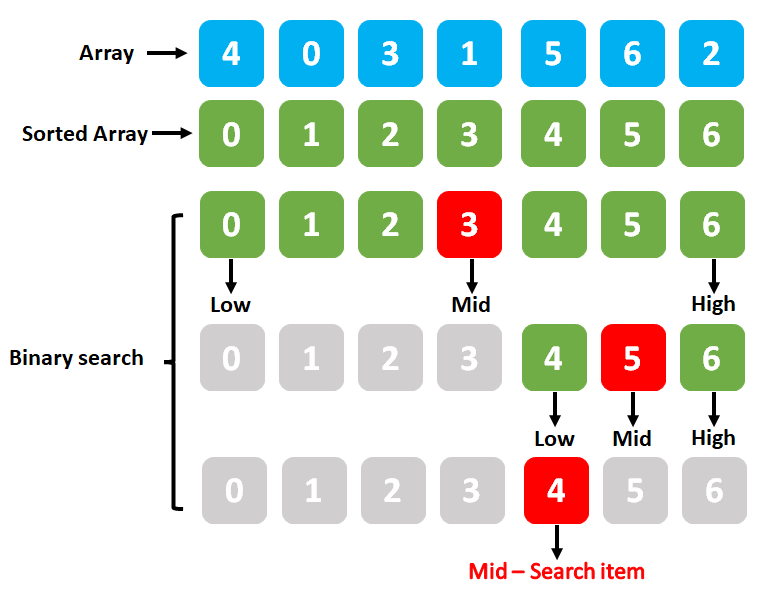
A binary search algorithm is a type of search algorithm that is commonly used due to its efficiency. It follows a divide-and-conquer approach to efficiently locate the target value by repeatedly dividing the search interval in half.
Specifically:
Start with a sorted array (It is mandatory!);
Define the search interval: Set the lower and upper bounds of the search interval. Initially, the lower bound is the first element of the list, and the upper bound is the last element of the list;
Find the middle element: Calculate the middle element of the search interval by taking the average of the lower and upper bounds. If the search interval has an odd number of elements, round down to the nearest integer to get the middle element;
Compare with target value: Compare the middle element with the target value that you are searching for;
Adjust the search interval: Based on the comparison of the middle element with the target value, you can either narrow down the search interval to the lower or upper half, or you may have found the target value;
Repeat steps 3-5: If the middle element is equal to the target value, the search is successful, and you can return the index of the middle element as the position of the target value in the sorted list. If the middle element is greater than the target value, update the upper bound to be the middle element minus one and repeat steps 3-5. If the middle element is less than the target value, update the lower bound to be the middle element plus one and repeat steps 3-5. Continue this process until the target value is found or the search interval is reduced to an empty interval (lower bound exceeds upper bound), indicating that the target value is not present in the list;
Termination: The binary search algorithm terminates when the target value is found, or when the search interval is reduced to an empty interval, indicating that the target value is not present in the sorted list.
Binary search has a time complexity of \(Big\ O = O(log_n)\), where n is the number of elements in the list. This makes it a very efficient algorithm for searching large sorted lists or array!
Look an example below.
Let’s to code a Binary search algorithm
First, let’s create an array/vector.
set.seed(123)

arr <- as.integer(runif(n = 15,
                 min = 1,
                 max = 100))
Let’s to select items to search.
I choose an exist element (89) and not exist element (100) in the vector.
# item 1
item_1 <- 89

# item 2
item_2 <- 100

# item 1 - description od array, sorted array and items.
cat("Array: ", arr,
    "\nSorted array: ",sort(arr),
    "\nLength: ",length(arr),
    "\nItem 1 = ", item_1,
    "\nItem 2 = ", item_2)
## Array: 29 79 41 88 94 5 53 89 55 46 95 45 68 57 11
## Sorted array: 5 11 29 41 45 46 53 55 57 68 79 88 89 94 95
## Length: 15
## Item 1 = 89
## Item 2 = 100Now, let’s to create a binary search function!
binarySearch <-
  function(arr,item) {
    # sorting the array
    sorted_arr <- sort(arr)
    # lowest index
    low <- 1
    # highest index
    high <- length(sorted_arr)
    # Start loop - while low lower/equal high continue searching...
    while (low <= high){
      # Mid index for searching the item
      mid <- as.integer(round((low + high) / 2))
      # Conditional - if mid-item equal 0, it is the item!
      if (abs(sorted_arr[mid] - item) == 0){
        return(mid)
        # or, if mid lower than item, update low
      } else if (sorted_arr[mid] < item){
        low <- mid + 1
        # or, if mid higher than item, update high
      } else {
        high <- mid - 1
      }
    }
    # or, if item does not found
    return(0)
}
Now, let’s to test!!!
# getting the item 1
index_1 <- binarySearch(arr = arr,
                        item = item_1)

# getting the item 2
index_2 <- binarySearch(arr = arr,
                      item = item_2)

# What index is the item 1 in?
if (index_1 != 0){
  cat("Element 1 is present at index ", index_1, "\n")
}else{
  cat("Element 1 not found")
}
## Element 1 is present at index 13# What index is the item 2 in?
if (index_2 != 0){
cat("Element 1 is present at index ", index_2, "\n")
}else{
cat("Element 2 not found", "\n")
}## Element 2 not foundcat("Sorted array to confer: ", sort(arr))## Sorted array to confer: 5 11 29 41 45 46 53 55 57 68 79 88 89 94 95
Hope you enjoyed it!😜!

- Posted on:
- April 10, 2023
- Length:
- 6 minute read, 1066 words
- See Also: